Nix Monitor
A DankMaterialShell plugin for monitoring Nix store disk usage and system generations
Nix Monitor
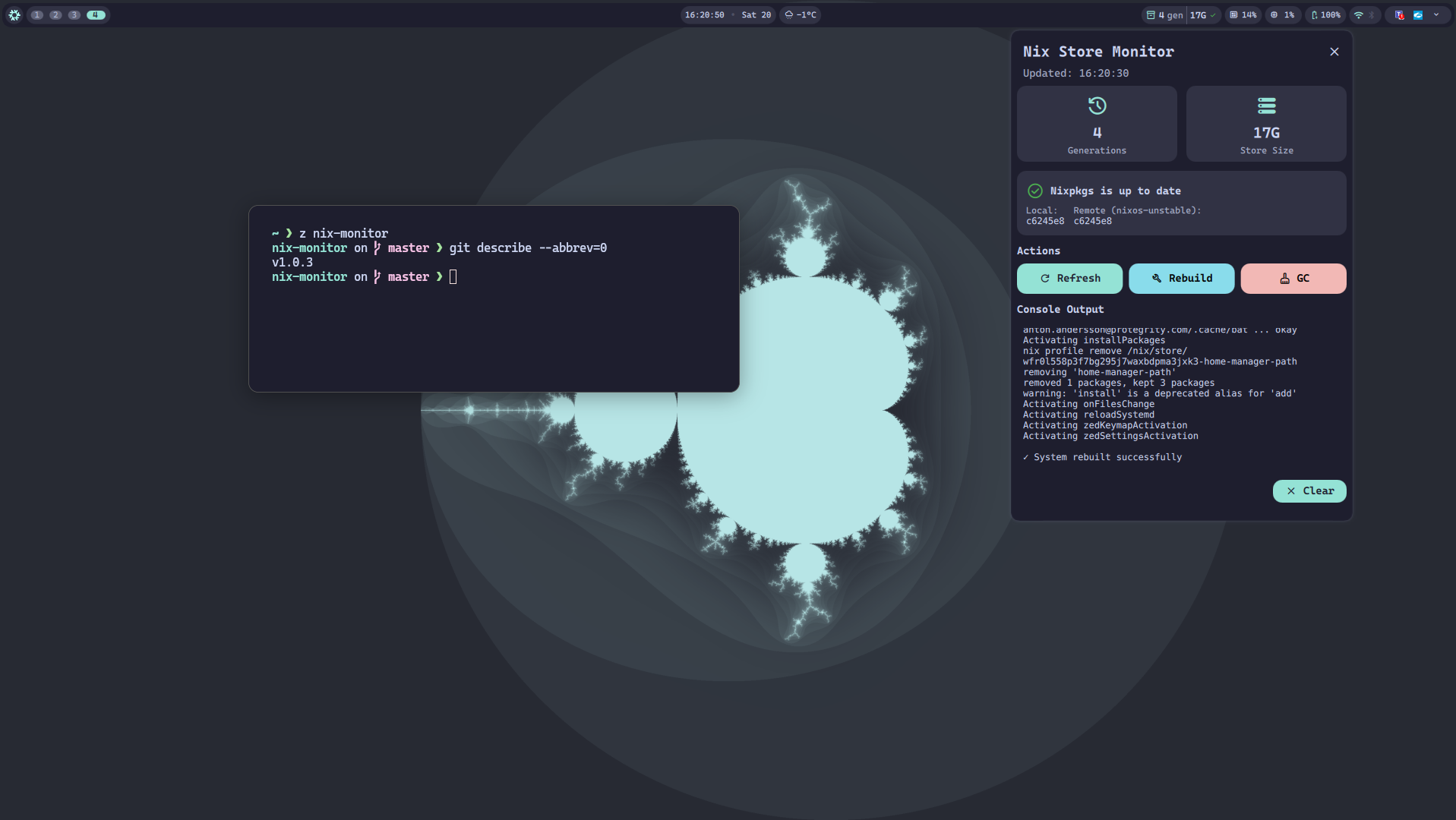
A DankMaterialShell plugin for monitoring Nix store disk usage and system generations with integrated system management capabilities.
Features
Bar Widget Display
- Generation count - Shows Nix system generations (configurable)
- Store size - Shows Nix store disk usage (configurable)
- Update status - Check icon shows nixpkgs status:
- Green: Up-to-date
- Yellow: Update available
- Red: Could not fetch version info
- Visual warnings - Icon and text turn red when store exceeds threshold
- Auto-updates - Configurable refresh interval
Detailed Popout Panel
Click the widget to open a detailed view with:
- Summary cards - Large stat cards for count and store size
- NixOS update status - Shows local and remote nixpkgs revisions with update availability
- Warning banner - Appears when store size exceeds threshold
- Real-time console - View command output as it runs
- Action buttons:
- Refresh - Update statistics immediately
- Rebuild - Run your configured rebuild command
- GC - Run your configured garbage collection command
- Cancel - Stop running operation
- Clear button - Hide console output
Configurable Settings
Access via DMS Settings → Plugins → Nix Monitor:
- Show/hide generation count
- Show/hide store size
- Update interval (60-3600 seconds)
- Warning threshold (10-200 GB)
- Enable/disable update checking
- NixOS channel selection (unstable, 24.11, 24.05, 23.11)
- Update check interval (300-86400 seconds)
Installation
As a Flake Input
For NixOS System Configuration
Add to your NixOS configuration.nix flake:
{
  inputs = {
    nix-monitor = {
      url = "github:antonjah/nix-monitor";
      inputs.nixpkgs.follows = "nixpkgs";
    };
  };

  outputs = { self, nixpkgs, nix-monitor, ... }: {
    nixosConfigurations.hostname = nixpkgs.lib.nixosSystem {
      modules = [
        nix-monitor.nixosModules.default
        {
          programs.nix-monitor = {
            enable = true;

            # Required: customize for your setup
            rebuildCommand = [
              "bash" "-c"
              "sudo nixos-rebuild switch --flake .#hostname 2>&1"
            ];
          };
        }
      ];
    };
  };
}
For home-manager Configuration
Add to your home-manager flake.nix:
{
  inputs = {
    nix-monitor = {
      url = "github:antonjah/nix-monitor";
      inputs.nixpkgs.follows = "nixpkgs";
    };
  };

  outputs = { self, nixpkgs, home-manager, nix-monitor, ... }: {
    homeConfigurations."youruser" = home-manager.lib.homeManagerConfiguration {
      modules = [
        nix-monitor.homeManagerModules.default
        {
          programs.nix-monitor = {
            enable = true;

            # Required: customize for your setup
            rebuildCommand = [
              "bash" "-c"
              "cd ~/.config/home-manager && home-manager switch --flake .#home 2>&1"
            ];
          };
        }
      ];
    };
  };
}
Activation
For NixOS
- Rebuild your NixOS configuration:
sudo nixos-rebuild switch --flake .#hostname - Restart DMS:
dms restart - Open DMS Settings → Plugins
- Click “Scan for Plugins”
- Toggle “Nix Monitor” ON
- Add to your DankBar layout
For home-manager
- Rebuild your home-manager configuration:
home-manager switch --flake .#home - Restart DMS:
dms restart - Open DMS Settings → Plugins
- Click “Scan for Plugins”
- Toggle “Nix Monitor” ON
- Add to your DankBar layout
Updating
For NixOS
After updating the plugin:
nix flake update nix-monitor
sudo nixos-rebuild switch --flake .#hostname
rm -rf ~/.cache/quickshell/qmlcache/
dms restart
For home-manager
After updating the plugin:
nix flake update nix-monitor
home-manager switch --flake .#home
rm -rf ~/.cache/quickshell/qmlcache/
dms restart
Note: Due to QML disk caching with Nix symlinks, you must clear the QML cache after plugin updates for changes to take effect.
Usage
Bar Widget
- The widget shows in your DankBar with an icon, generation count, and store size
- Click to open the detailed popout panel
- Color changes to red when store exceeds threshold
Popout Panel
- Refresh - Updates all statistics immediately
- Rebuild - Runs your configured rebuild command
- GC - Runs garbage collection (
nix-collect-garbage -dby default)
Console Output
- Appears automatically when running Rebuild or GC
- Shows real-time stdout/stderr
- Auto-scrolls to latest output
- Click “Clear” to hide
Configuration
The plugin provides sensible defaults for NixOS system monitoring, but rebuildCommand is required and must be configured for your specific setup.
Default Commands
If not overridden, the plugin uses these NixOS defaults:
generationsCommand: Lists system generations from/nix/var/nix/profiles/systemstoreSizeCommand: Checks/nix/storedisk usage withdu -shgcCommand: Runsnix-collect-garbage -dupdateInterval: 300 seconds (5 minutes)
Note: rebuildCommand has no default and must be explicitly configured because rebuild commands vary significantly between:
- NixOS with flakes vs without flakes
- home-manager with flakes vs without flakes
- System-wide vs user-specific configurations
NixOS Module Example (Minimal)
Uses all defaults - only rebuildCommand is required:
programs.nix-monitor = {
  enable = true;

  # Required: customize for your setup
  rebuildCommand = [
    "bash" "-c"
    "sudo nixos-rebuild switch --flake .#hostname 2>&1"
  ];
};
NixOS Module Example (Full Customization)
programs.nix-monitor = {
  enable = true;

  rebuildCommand = [
    "bash" "-c"
    "sudo nixos-rebuild switch --flake .#hostname 2>&1"
  ];

  # Use sudo for garbage collection
  gcCommand = [
    "bash" "-c"
    "sudo nix-collect-garbage -d 2>&1"
  ];

  # Check for updates on the 24.11 stable channel
  nixpkgsChannel = "nixos-24.11";

  updateInterval = 600;
};
home-manager Module Example (Minimal)
programs.nix-monitor = {
  enable = true;

  # Required: customize for your setup
  rebuildCommand = [
    "bash" "-c"
    "cd ~/.config/home-manager && home-manager switch --flake .#home 2>&1"
  ];
};
home-manager Module Example (Full Customization)
programs.nix-monitor = {
  enable = true;

  # Track home-manager generations instead of system generations
  generationsCommand = [ "sh" "-c" "home-manager generations 2>/dev/null | wc -l" ];

  rebuildCommand = [
    "bash" "-c"
    "cd ~/.config/home-manager && home-manager switch --flake .#home 2>&1"
  ];

  # Optional: customize other settings
  updateInterval = 300;
};
Configuration Options
Both NixOS and home-manager modules use the same programs.nix-monitor namespace with identical options.
Required:
rebuildCommand- Command to run for system rebuild (REQUIRED)
Optional (with defaults):
generationsCommand- Command to count system generations
Default:nix-env --list-generations --profile /nix/var/nix/profiles/system | wc -lstoreSizeCommand- Command to get Nix store size
Default:du -sh /nix/store | cut -f1gcCommand- Command to run for garbage collection
Default:nix-collect-garbage -dupdateInterval- Update interval in seconds
Default:300(5 minutes)localRevisionCommand- Command to get local nixpkgs revision
Default:nixos-version --hash | cut -c 1-7remoteRevisionCommand- Command to get remote nixpkgs revision
Default:git ls-remote https://github.com/NixOS/nixpkgs.git nixos-unstable | cut -c 1-7
Performance tip: For faster update checks, use curl with GitHub’s API:remoteRevisionCommand = [ "${pkgs.bash}/bin/bash" "-l" "-c" "${pkgs.curl}/bin/curl -s https://api.github.com/repos/NixOS/nixpkgs/git/ref/heads/nixos-unstable 2>/dev/null | ${pkgs.jq}/bin/jq -r '.object.sha' 2>/dev/null | cut -c 1-7 || echo 'N/A'" ];nixpkgsChannel- NixOS channel to check for updates
Default:nixos-unstable(Options:nixos-unstable,nixos-24.11,nixos-24.05,nixos-23.11)
Requirements
- DankMaterialShell >= 1.0.0
- Nix package manager
- Shell (sh/bash)
- git (for update checking)
License
MIT
Author
Anton Andersson (@antonjah)